


Splitwise
4.17.65K Reviews
App Specs
- Version
- 26.8.2
- Updated On
- License
- Free
- Downloads
- 10,000,000+
- Developer
- Splitwise
- Categories
- Finance
- Platform
- Android, iOS
Screenshots
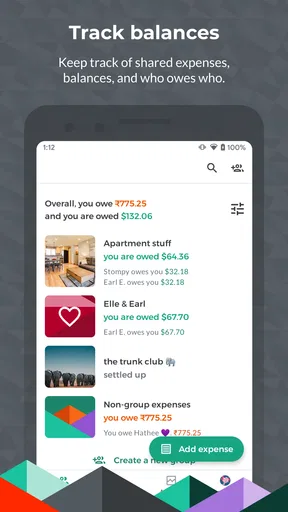
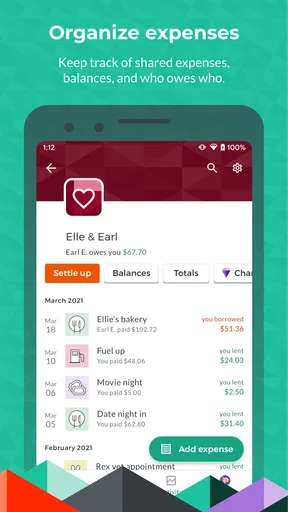
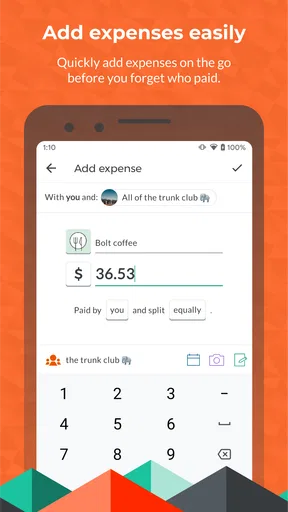
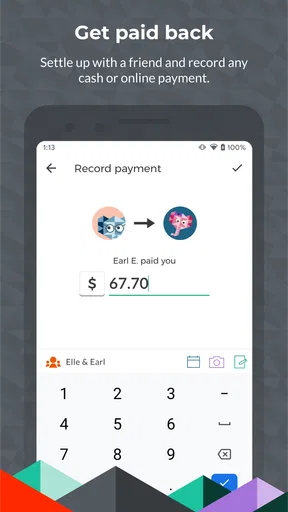
 Analysis by AppCompare
I reach for a shared-expense app when a group’s spending is too mixed up for a quick mental tally but too ordinary to justify a spreadsheet. That is where Splitwise makes sense: it gives friends, roommates, and travel groups a common record of what was paid and how the cost should be divided. I like the idea most when people are comfortable entering expenses as they happen, rather than trying to reconstruct a week’s worth of receipts at the end.
A simple habit makes the shared ledger useful
The practical starting point is to make a group for one ongoing situation, such as a household or a trip, and keep its expenses in that group. When someone pays for groceries, a taxi, or a meal, they can record the amount and choose who shares it. The value is not merely seeing a running balance; it is preserving the context of each charge so the group can understand why one person is owed money.
For example, on a weekend away, one friend might cover the groceries while another pays for a ride that only some people took. Recording those separately is more accurate than splitting the entire weekend evenly. I would add the expense while the receipt or payment is still fresh, and include a clear description. That small routine is especially helpful when several people take turns paying and nobody wants to become the group’s unofficial accountant.
Choose the split before balances become confusing
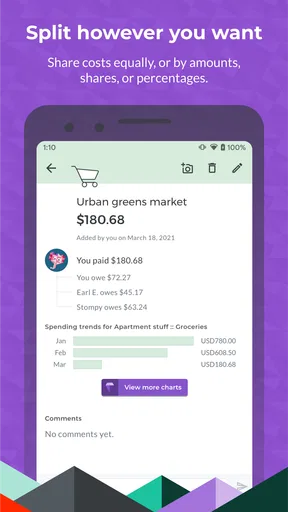
Equal division is convenient when everyone genuinely shared the cost, but it is not always fair. Splitwise lets you enter exact amounts, percentages, or shares, which makes it better suited to uneven situations: perhaps one person joined a meal late, or a household purchase was only for some roommates. I would decide the split at the time of entry, while everyone remembers the arrangement, instead of leaving a vague balance to sort out later.
This is also where clear group habits matter more than clever bookkeeping. Agree in advance whether shared staples, cleaning supplies, or occasional takeout belong in the household group. If one person regularly buys personal items alongside common groceries, record only the shared portion or make the distinction obvious. A ledger can organize agreed expenses, but it cannot settle disagreements about what the group considers shared.
Using Splitwise well in everyday life
I get the most from Splitwise when I treat it as a shared record, not as a reminder to settle every small balance immediately. I’d agree with the group on what counts as shared, then add expenses while the details are still clear; that makes later check-ins calmer and more useful. The next step is shaping that routine around the people and costs involved.
Set the app up around the people and costs involved
First things first, Splitwise is super easy to set up. You can download it from both Android and iOS platforms. Once you've got it installed, creating an account is a breeze. You can even sign up using your Google or Facebook account if you want to skip the usual email and password routine.
Worth Reading Before You Choose

Flipboard Shows What News Apps Must Do Beyond the Feed

Switching to Android Auto Means Rethinking Your Driving Routine

Google Calendar Makes a Crowded Week Easier to Manage

Ludo King Makes the Most of the Minutes Between Plans

Baby Panda World Brings Quick Play to Modern Phones, but Its Game Library Feels Busy

ESPN’s Live Game View Makes Following Close Games Easier
The interface is pretty intuitive. You start by creating a group for your trip, household, or any situation where you need to track shared expenses. Once you've got your group set up, you can start adding expenses. The cool part? You can split these expenses any way you like. It’s not just about dividing everything equally. You can specify exact amounts, percentages, or even split by shares if someone’s paying a little extra for something.
Features That Stand Out
One of my favorite features is the ability to add expenses in different currencies. Perfect for those international adventures where you’re juggling dollars, euros, and yen. Splitwise handles all the conversions, so you don’t have to worry about carrying a calculator in your pocket.
Another great feature is the integration with PayPal and Venmo. Once you’ve settled up, you can make payments directly through these platforms. It’s seamless, and you don’t have to switch between apps to clear your debts.
Notifications are also a lifesaver. Splitwise sends reminders when you’ve got outstanding balances. No more awkward conversations or uncomfortable reminders from friends about money you owe. The app handles it all diplomatically.
Build a routine for recurring costs
Before discovering Splitwise, I used to resort to spreadsheets or just a mental note of who owed what. But let’s face it, things get messy really fast. With Splitwise, all those worries just disappear. You can add recurring expenses like rent or utilities, and the app will automatically remind everyone about their shares each month.
For those of us who are a bit forgetful, this is a godsend. Plus, you can track your spending habits over time. It’s a bit of a reality check to see how much those little expenses add up on a trip or over a month.
For a shared home, I would keep predictable bills and irregular purchases distinct in the group’s records. Rent and utilities have a regular rhythm; a one-off repair or a replacement household item needs a description that explains what it was. That makes it easier to review a balance later without confusing a recurring obligation with a cost that should be discussed once.
Settings and shortcuts that save effort
Before relying on reminders, I would check that the people in the group are the right participants and that each expense is assigned to the correct people. A reminder can prompt someone to look at a balance, but it cannot correct an entry that was split incorrectly. It is worth taking a moment to review the expense details before adding it, particularly for a purchase that not everyone shared.
The best shortcut is a repeatable workflow, not a complicated system: open the relevant group, record the payer, add a useful description, and choose the split immediately. For recurring household charges, use the recurring-expense option rather than retyping the same arrangement from memory. For a trip, keep a quick note of unusual exceptions—such as a meal shared by only part of the group—so the entry is easy to make accurately when you have a moment.
Currency support is useful when a trip crosses borders, but I would still treat the recorded conversion as a convenience rather than a substitute for checking the amount the group actually agreed to share. Keep the original charge and the intended split clear, especially if people are paying in different currencies. That makes a later review less dependent on anyone remembering which exchange calculation they used.
Where it is less suitable
Splitwise is strongest when a group wants to keep a running record and settle balances periodically. It is less compelling if you share costs only once in a while and can agree on the arithmetic in a message, or if one person is expected to enter everything while the others never check it. In that situation, the app may feel like extra administration rather than a relief.
It also should not be mistaken for a shared bank account or a guarantee that someone will pay. Tracking a debt and transferring money are separate steps, even when payment services are available in the app. I would confirm that a balance is correct before settling it, and use the payment method the group is comfortable with. People who need formal accounting, strict expense approval, or a detailed business ledger may be better served by a tool built for those jobs.
Compared with a spreadsheet, Splitwise is easier to use for a group that wants individual expenses and balances kept together without maintaining formulas. A spreadsheet can be more flexible for custom categories or analysis, but someone has to design and maintain it. Compared with a payment app alone, Splitwise focuses on explaining who owes what across multiple purchases; a payment app is often simpler when the only task is sending one person money. I see the two approaches as complementary rather than interchangeable.
Room for Improvement?
Now, no app is perfect, right? While I love Splitwise, I’ve found that the app can get a bit sluggish if you’re dealing with a huge number of transactions or if your internet connection isn’t the best. Also, while the currency conversion feature is fantastic, it would be great if it updated in real-time more frequently.
The app is free, which is awesome, but there is a Pro version. It offers some extra features like receipt scanning and advanced reports. If you’re a hardcore user, it might be worth the upgrade, but for most casual users, the free version works just fine.
That distinction is useful when deciding whether to pay: I would first see whether the free experience covers the group’s actual routine, then consider paid extras only if receipt handling or reporting would solve a recurring problem. The app is free to download, with in-app purchases listed from under a dollar to just under sixty dollars per item. Those purchase options are not a reason to upgrade by themselves; the question is whether the added tools would save enough effort for your particular household or travel group.
Who will get the most from it
I would recommend it to roommates splitting regular bills, friends who take turns paying during trips, and anyone who shares a steady stream of small costs with the same people. Its everyday strength is continuity: each person can see how separate purchases contribute to the group’s overall balance. It is also useful for a trip where not every activity involves the full group, because uneven splits can reflect who actually took part.
I would be more cautious about recommending it to people who dislike recording purchases as they happen, or to groups where nobody agrees on what counts as shared. A ledger is only as helpful as the entries and the group’s willingness to review them. If the social friction comes from unclear expectations rather than forgotten arithmetic, a brief conversation about the rules should come before installing any expense tracker.
Features That Stand Out
One of my favorite features is the ability to add expenses in different currencies. Perfect for those international adventures where you’re juggling dollars, euros, and yen. Splitwise handles all the conversions, so you don’t have to worry about carrying a calculator in your pocket.
Another great feature is the integration with PayPal and Venmo. Once you’ve settled up, you can make payments directly through these platforms. It’s seamless, and you don’t have to switch between apps to clear your debts.
Notifications are also a lifesaver. Splitwise sends reminders when you’ve got outstanding balances. No more awkward conversations or uncomfortable reminders from friends about money you owe. The app handles it all diplomatically.
How It Makes Life Easier
Before discovering Splitwise, I used to resort to spreadsheets or just a mental note of who owed what. But let’s face it, things get messy really fast. With Splitwise, all those worries just disappear. You can add recurring expenses like rent or utilities, and the app will automatically remind everyone about their shares each month.
For those of us who are a bit forgetful, this is a godsend. Plus, you can track your spending habits over time. It’s a bit of a reality check to see how much those little expenses add up on a trip or over a month.
What to expect before installing
Splitwise is a finance app from developer Splitwise, and its staying power is reflected in an average rating of 4.2 from around 189,000 ratings, alongside roughly 7,500 written reviews and more than 10 million installs. It is free, rated for Everyone, and its current version is 26.2.2. It has been available since September 12, 2011, and requires Android 9 or later on Android devices.
Those details make it a familiar option rather than a niche experiment, but I would still judge it by how your own group behaves. A household that enters shared costs consistently will get a clearer picture than one that waits until the end of the month. The app can make the accounting less awkward; it cannot make people agree about spending or remember every purchase for them.
Final Thoughts
Overall, Splitwise has been a fantastic tool for simplifying shared expenses. Whether you’re a traveler, student, or just someone who shares expenses regularly, it’s definitely worth checking out. It takes the stress out of managing money with friends and ensures everyone pays their fair share without the awkwardness.
So, if you’re tired of keeping tabs on who owes what and want an easy solution for shared expenses, give Splitwise a try. You might just find it’s the app you never knew you needed.
Pros
- Simplifies expense tracking among groups.
- Easy to add and settle up expenses.
- Supports multiple currencies for travel.
- Intuitive user interface and layout.
- Syncs across devices seamlessly.
Cons
- Limited features in free version.
- Ads can be intrusive for free users.
- Occasional syncing issues reported.
- Lacks offline functionality.
- No advanced budget tracking tools.
FAQs for Splitwise
What is Splitwise and how does it work?
Splitwise is an app designed for managing shared expenses and bills among friends, family, and roommates. Users can create groups, add expenses, and Splitwise will automatically calculate each person's share. The app ensures transparent tracking of who owes whom, simplifying the process of settling up, whether it’s for group trips, shared apartments, or dining out.
Is Splitwise free to use, and are there any premium features?
Splitwise offers a free version with essential features like tracking expenses and settling balances. However, it also provides a premium subscription called Splitwise Pro. Pro features include advanced reports, currency conversion, receipt scanning, and integration with other financial tools. Pricing for Pro varies, so it's best to check the app for current rates.
How secure is the data on Splitwise?
Splitwise takes user security seriously. It employs industry-standard encryption to protect data during transmission and storage. Additionally, Splitwise does not store passwords directly but uses secure authentication methods. Users are encouraged to create strong passwords and enable two-factor authentication for added security.
Can Splitwise handle different currencies for international trips?
Yes, Splitwise supports multiple currencies, making it ideal for international travel. Users can enter expenses in various currencies, and the app will convert them based on current exchange rates. This feature helps maintain clarity on expenses and ensures accurate balance calculations among group members from different countries.
Does Splitwise integrate with other payment platforms?
Splitwise integrates with several payment platforms, such as PayPal and Venmo, allowing users to settle up directly through the app. This integration simplifies the process of paying or receiving money, as users can quickly transfer funds without leaving Splitwise. Availability of integrations may vary depending on the user's country.


